Never lose track of an auction again using my Auction Tracker Cards™! I have designed these cards for new and experienced eBay® buyers alike. All you need is a 3x5 index card file box, a computer with the free Adobe Acrobat Reader® program, a laser printer, scissors, and an assortment of colored paper. This system is for tracking the progression of your purchased auctions; everything from contacting the seller to receiving the package. This is the system I have been using for years, and I'm ready to disclose to you my secret and provide to you the files necessary to be an aware, knowledgeable and successful eBay® buyer.
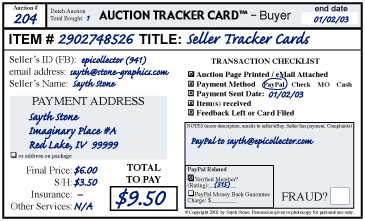
Auction #: Write in this section the number of this purchased auction. In this example, this card would be my 204th auction where I was the high bidder. Maybe an item is not received, but that comes later in the card recording.
Item #: eBay® assigns this number to auctions. Use it in all messages to eBay® and to your seller for quick reference to your questions or instructions.
Title: This is the title of your auction. Make sure to use a descriptive title of the auction to avoid confusion when looking at the card a year later.
Dutch Auctions: If this is a multiple item auction, record how many items you won. Here, he bought one item in auction 2902748526. Remember that you are not obliged to complete the transaction if you did not win the amount you desired.
end date: This is the date the auction ended. Your Auction Number is based off of this end date; meaning your Auction Tracker Cards™ are filled out in the same order that your auctions ended. You also will use this date for monthly filing.
Seller Information: As you collect information about your seller, record it in the left side of the Auction Tracker Card™. The User ID, feedback and email address of your buyer can be immediately recorded at the auction’s end. The payment address might be provided by the seller. Always confirm delivery address for payment with the seller if they do not specify it. If payment is sent via PayPal®, mark if the seller is verified or not, and their PayPal® Reputation score. There is some additional insurance protection for members that paid a verified seller and are granted an eBay® Fraud Claim. If you use the PayPal® Money Back Guarantee option, note it in the box.
Payment Information: This is where you will record how much you are going to pay for the auction. Include the Shipping/Handling fee, Insurance and any Other Services if you are going use them. The most
common other service would be buying a tracking number. Mark the sum of these amounts into the TOTAL TO PAY box.
Transaction Checklist: This is where you mark the progression of this auction. Put all Auction Tracker Cards™ in the YET TO PAY section of your file box. Print out the auction page and any email instructions from the seller, and check the first box. If you know what payment method you are going to use (and the seller will accept it), check the second box and circle the intended payment method. Notice that wire transfer is not an option. NEVER send a wire transfer! When the payment is sent, check the third box, write the date, and file the card in your PAID / WAITING section of the card file box. When the item is received, check the fourth box and place in the RECIEVED – WAITING TO FILE section. Leave feedback if desired, then place the card in the correct month with the other archived cards. Before 30 days have expired after sending payment with PayPal®, file a complaint with them if the item has not arrived. If the auction has passed the 30 day mark, file an eBay® Fraud Alert and file the card in the NO ITEM – OVER 30 DAYS section. If the item does not arrive or no refund is given after 60 days, send a Fraud Protection Claim to eBay® (if over $25) and file in the NO ITEM – OVER 60 DAYS section. File the card away if the problem is resolved or if you are not eligible for a Fraud Claim.
Notes Box: Use this box (and the blank other side of the card) for recording anything else concerning the auction. That could include any messages to the seller, what shipping service is used, if you file a fraud claim (along with its number), a PayPal transaction number, alternate contact information for the seller, special payment arrangements, expected ship date, etc. If the auction is cancelled and you did not send money, note it in the box and file the card away.
FRAUD?: If you do not get your item (or a refund) and you have to file the auction card, mark this box. It means you did not get your item, and you might be able to take a loss on your taxes (consult a tax advisor).
©Copyright 2003-2008 by Sayth Stone. Auction Tracker Cards™ Trademarked by Sayth Stone.
Acrobat Reader® is a registered Trademark of Adobe Systems Incorporated®.
PayPal® and eBay® are registered Trademarks of eBay Inc.
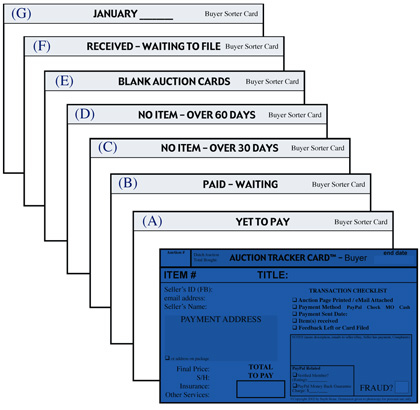
(A) YET TO PAY Take some blank Auction Tracker™ cards from the BLANK AUCTION CARDS section to fill out newly completed auctions. When you pay for an auction, check the Payment Sent box, fill out the appropriate parts of the card and file it in the PAID – WAITING section.
(B) PAID – WAITING This is where auctions that have been paid for are placed. The card will stay here until you either receive the item or 30 days have passed. If you get the item, file the card in section (F) or the correct archive month section (G).
(D) NO ITEM – OVER 60 DAYS If you did not resolve the problem with a Fraud Alert, submit a Fraud Protection Claim to eBay®. The final bid on the auction has to be over $25 to qualify.
(E) BLANK AUCTION CARDS Place your blank cards here. It is a good idea to put the Auction Number on the next card ready to be used for quick reference when the next batch of auctions end.
(F) RECEIVED – WAITING TO FILE When an auction item is received, a refund is issued, or the seller is marked as a fraud, you can place the auction card here until you are ready to properly file it in the monthly dividers.
(G) ARCHIVE AUCTIONS You will store your auctions every month using these dividers. After your current box fills up, transfer the older auctions to separate index card boxes for archiving.
THICKER DIVIDERS You should print these dividers on cover stock paper. It is a little thicker than regular paper, and holds up from the ruffling and sorting better.
COLOR CODED AUCTIONS You should print or photocopy these Auction Tracker Cards™ on colored paper. Change the color every month to track how old auctions are as they progress through this time sensitive file box.
THE BUYER CARD EXPLAINED
(C) NO ITEM – OVER 30 DAYS
If you don’t have your auction after 30 days, file a Fraud Alert with eBay®. This report closes after 30 days, and then eBay® will provide you with Protection Claim instructions.

Free counters provided by Andale.